As a note-taking tool I’ve consistently used, Notion has inspired me to write many articles about my experience with it. Last November, I compiled these into the article “Diary9 Notion Note-Taking Practice 2.0”. This year, the addition of AI features prompted me to share my latest experience—it has become my best creative assistant.
Introducing Notion AI
Notion AI is based on the GPT-3 artificial intelligence model and assists with text processing. Through natural language processing and machine learning technologies, it can automatically analyze and summarize text content, providing more intelligent writing support.
Notion AI is suitable for various user groups, including students, professionals, writers, journalists, and more. Whether for academic research, business writing, or daily tasks like composing emails or social media posts, Notion AI offers robust writing support, helping users complete text creation tasks more effortlessly.
How to Use Notion AI
The user experience is very convenient. Simply press the spacebar on a blank line to trigger the AI function, then tell the AI what you need in the pop-up window. Alternatively, you can select a block of text and choose AI assistance from the pop-up menu.
During use, you can select different functions based on your needs, such as creating a table, drafting an article, outlining, scheduling meetings, etc., to improve writing efficiency and quality.
Below are a few methods I commonly use:
Brainstorming
After determining a topic direction, create a page and input the subject content, letting Notion AI help you draft an outline and overview. Typically, the accuracy of the provided content isn’t very high, but that’s okay. It’s sufficient for collecting inspiration during the brainstorming phase.
In my view, the process works like this: AI generates a large number of keywords, and you then pick the ones you find interesting, retain them, and proceed to refine and expand upon them.
This method differs significantly from the traditional writing approach, which involved slowly pondering every word before writing the required paragraphs. Now, you only need to determine the general direction, and the process of refining details can be left to AI. Let it keep trying until you achieve a result you’re relatively satisfied with.
Text Polishing
Text polishing primarily involves two functions: improving writing quality and correcting spelling and grammar errors.
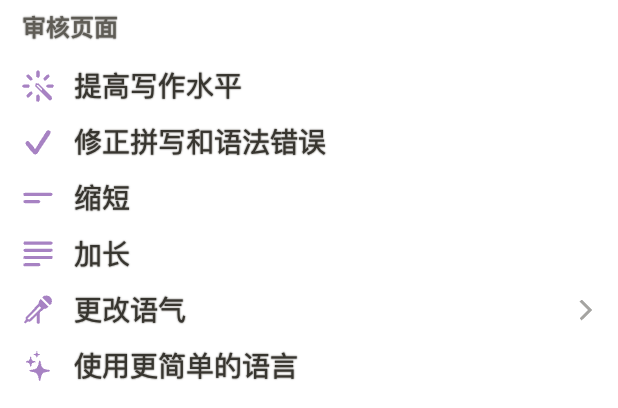
I’m accustomed to using voice input to express ideas conversationally and draft a passage. The wording of the draft is usually not very precise, but that doesn’t matter—it allows for very quick generation of text content. Then, using the two functions mentioned above, I polish and revise the text.
You can select a section of content and replace words or symbols, adjust phrasing until you’re satisfied. Additionally, you can modify the tone of paragraphs to make them more professional, natural, straightforward, etc.
Shortening and Lengthening
This is based on already having a draft where the content might feel too verbose or too brief, leading to the two needs described in the heading.
So, how do we achieve this? A straightforward approach is to use the AI’s shorten and lengthen functions to adjust entire paragraphs. However, this adjustment is limited to the selected paragraph. The resulting content is generally similar to the original paragraph, possibly just expressed in a more concise or more verbose manner.
If you have higher requirements, you can try the following methods:
- Use simpler language
- Continue writing
Use Simpler Language
This is a function that simplifies expression in wording, somewhat akin to the style of instruction manuals. I like using this function to write software feature descriptions or to condense suggestion paragraphs given by ChatGPT.
Continue Writing
After inputting a section of content, letting AI continue writing will generate a series of text based on the preceding content and context. It’s recommended to select a block of text for continuation. If nothing is selected, the continuation will be based on all preceding paragraphs, often yielding unsatisfactory results.
Translation
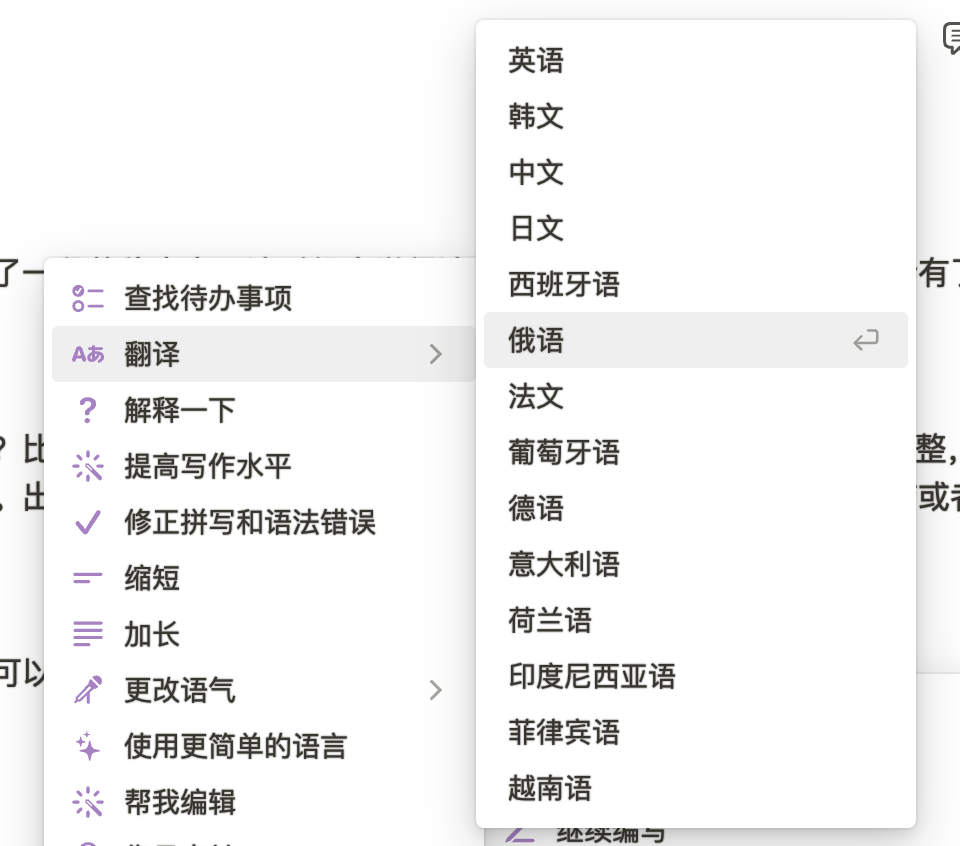
Using AI, you can translate paragraphs or entire sections into other languages. Currently supported languages include:
Blogger Recommendations
Here are some bloggers on YouTube who share Notion usage tips:
These bloggers share a wealth of high-quality content about Notion, including usage tips, workflows, template sharing, and more. I hope this is helpful to you!
💡 Thank you for reading! Feel free to share the article or reach out to me via email to exchange ideas.
The RSS address for this site has been updated. Please resubscribe, dear readers!