About half a year ago, I read Mr. Shaonan’s “Product Meditation Notes” and learned about the concept of knowledge curation and the issue of overly fragmented information distribution in the Chinese internet. Each application is a data silo, and to access this information, we must install all the apps on our phones to enter these silos. This experience significantly increases the cost of obtaining information. In a previous article, I mentioned the need to control personal information consumption, which can effectively reduce the time we spend reading information each day.
The time spent consuming information can be divided into two parts: searching and reading. My idea is to reduce the time spent searching so that more time can be devoted to reading. I once thought we needed to become the knowledge curators mentioned in “Product Meditation Notes,” manually controlling the entire information system to help clarify the amount of information we access, thereby reducing search time. However, I never expected that at the beginning of 2023, AI systems would experience a major explosion. The emergence of features like ChatGPT and New Bing shifted the role of curator from ourselves to AI.
Based on the above concepts, I began to think and practice integrating AI into my workflow, allowing it to play the role of a small assistant in the creative process. It can help me organize information, outline ideas, clarify thoughts, polish text, and more. I started shifting the focus of creation to thinking about content direction and overall concept communication. Due to the uncertainty of existing AI systems, after integrating all content such as images, text, audio, and video, I still need to perform a final proofread.
Next, I will introduce the AI products I am currently using and explain their roles in my creative process. Each product has its advantages and disadvantages, as well as the scope of problems it can currently handle. Personally, I believe that strong artificial intelligence has not yet emerged, and it is impossible to use a single AI product to handle all problems.
- Brainstorming in the Early Stages of Creation (ChatGPT)
I am currently using ChatGPT from OpenAI. It is mainly responsible for helping me expand ideas during the early brainstorming phase. I continuously ask it questions to broaden the scope of topics. However, since it currently cannot connect to the internet, the accuracy of its data cannot be guaranteed. I will search for materials and provide them to ChatGPT, asking it to help summarize the content and improve the accuracy of its answers.
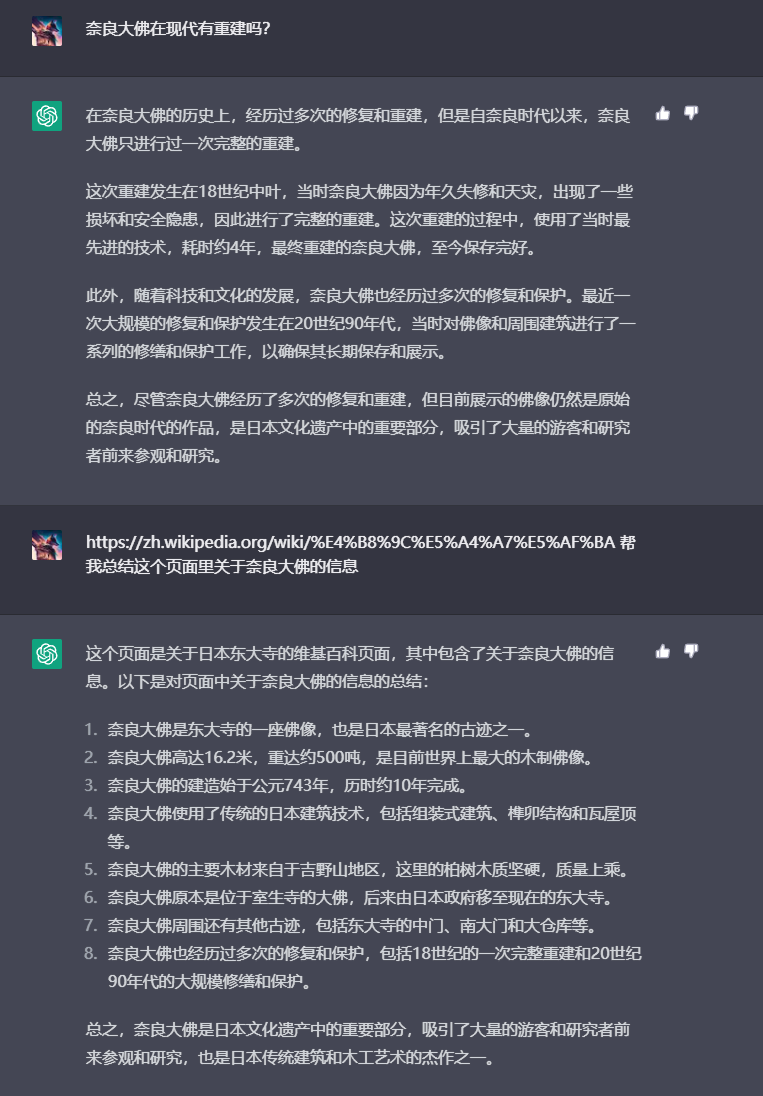
I will create a new chat window to train content related to specific topics. Accumulating data of the same type over time can significantly improve its accuracy. For example, I recently read a book about the Great Buddha of Nara and wanted to write a blog post about it. I can collect information on the historical background, construction motivation, building methods, visiting routes, and whether it has been renovated, then ask ChatGPT questions and summarize some content details from its answers to write my article.
The image below shows the specific conversation content:
I personally look forward to Microsoft’s New Bing, which is essentially a connected version of ChatGPT. Although I haven’t obtained testing access and cannot experience it in-depth, based on the experiences of friends on Twitter, it is more powerful than ChatGPT. However, recent news indicates that Microsoft has reduced its functionality, limiting the number of questions it can answer, making it feel significantly less intelligent overall.
- Information Integration and Polishing (Notion)
At this stage, the content scope has been clearly defined. I will use Notion to organize and integrate information, placing relevant content into Notion pages. I will leverage Notion’s AI features to help me draft article outlines. In subsequent stages, based on the collected information and content, I will use voice input to quickly draft content. After writing the general content, I will use Notion AI to polish the text and further refine the article.
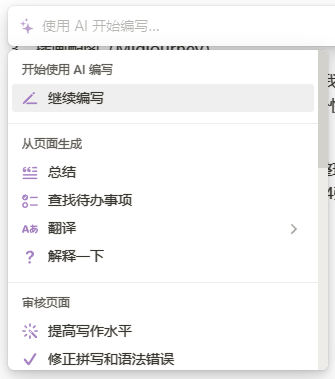
Notion AI offers many features for writing articles, such as generating outlines, continuing paragraphs, correcting grammatical errors, translating text, and more. These features are very helpful for writing. For text creators, these functions can effectively save time spent on intermediate构思. You can quickly obtain a draft and then edit, proofread, refine wording, and enhance the richness of the article based on that draft.
Notion’s AI currently offers the best user experience among the note-taking applications I use. Simply press the spacebar on a blank line to summon the AI.
- Illustration and Image Creation (Midjourney)
Midjourney is an AI illustration tool that helps me quickly create illustrations to enhance my articles. It is very simple to use—just input some keywords, and it automatically generates illustrations. Although it cannot yet meet all illustration needs, it serves as a tool for quickly obtaining materials and helps me save a lot of time.
I can conceptualize specific scenes for illustrations and use ChatGPT to organize keywords. Then, I can use the MidJourney Prompt Helper tool to add elements like style and material to these keywords. Next, I input the organized keywords into the Midjourney Bot chat window. After the bot diligently renders them, I receive four draft images. I can then extend or optimize based on these images to better align with my vision.
The above summarizes my experience using AI for creation over this period. I hope it helps everyone get started with AI creation! Feel free to reach out and exchange ideas with me!
💡 Thank you for reading! Feel free to share this article or write to me to exchange ideas.
The RSS address of this site has been updated. Please resubscribe, dear readers!